
Every Club Event, From Creation to Gate Check-In
Create events, publish the schedule, add different ticket types and open registration to members and the public. Verify payment references, screen bookings, and check attendees in with QR.
Why Clubs Are Upgrading to Lab of Club
See the immediate operational difference when moving from fragmented tools to a purpose-built club OS.
Events Run on Chats and Paper Lists
- Schedules, venues and categories live in scattered messages
- One flat guest list — no ticket types, no member vs public control
- Payments arrive with no proof, and nobody verifies them
- Gate entry is a paper-tick scramble with no booking screening
Create, Ticket, Verify, Screen, Check In
- Create events with start/end date-time, venue, category and guest/approval policy
- Add ticket types (e.g. Normal/Free) with sold counts and Active state
- Registrants pay per your guidelines and submit a transaction reference you verify
- Screen bookings and approve only who you need — then QR-scan them at the gate
Engineered for Operational Excellence
Explore the purpose-built tools designed to give your staff and committee complete control.
Event Details That Everyone Understands
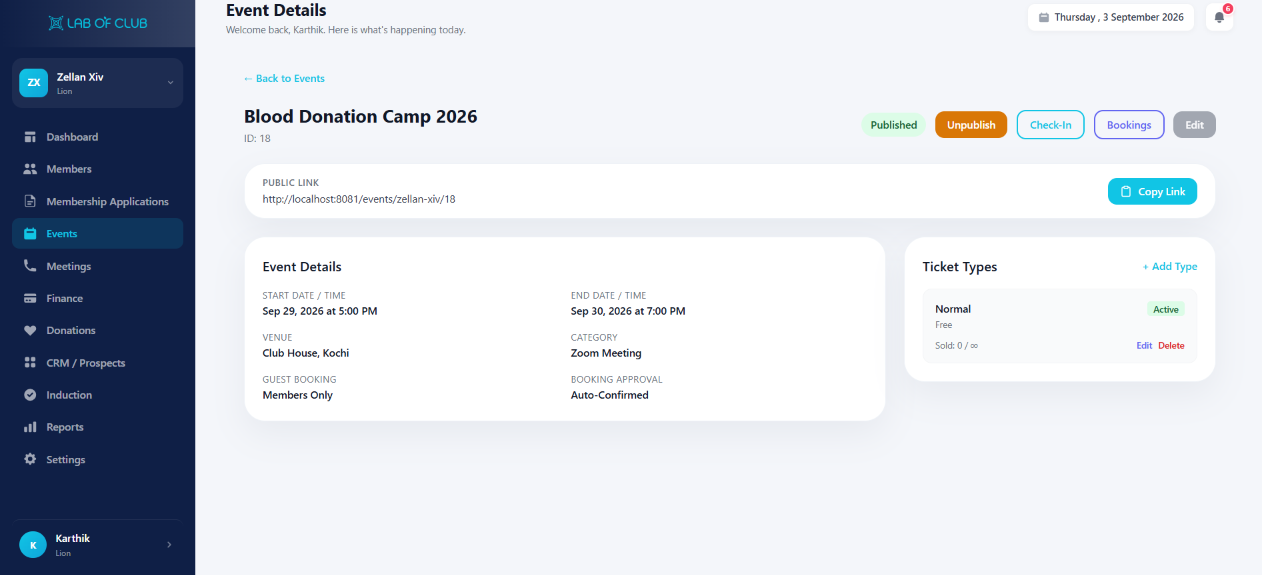
Publish Blood Donation Camp-style pages: title, start/end, venue (e.g. Club House, Kochi), category, guest booking rule and approval mode.
- Start Date/Time and End Date/Time with category (e.g. Zoom Meeting, Camp, Gala)
- Venue, Guest Booking (Members Only vs Public) and Booking Approval (Auto vs Manual)
- Published / Unpublish states plus public link with Copy Link
- Edit, Bookings and Check-In actions right from the event header
Ticket Types + Verified Payment References
Add different ticket types and let members and the public register. They pay using your payment guidelines and hand you the transaction reference.
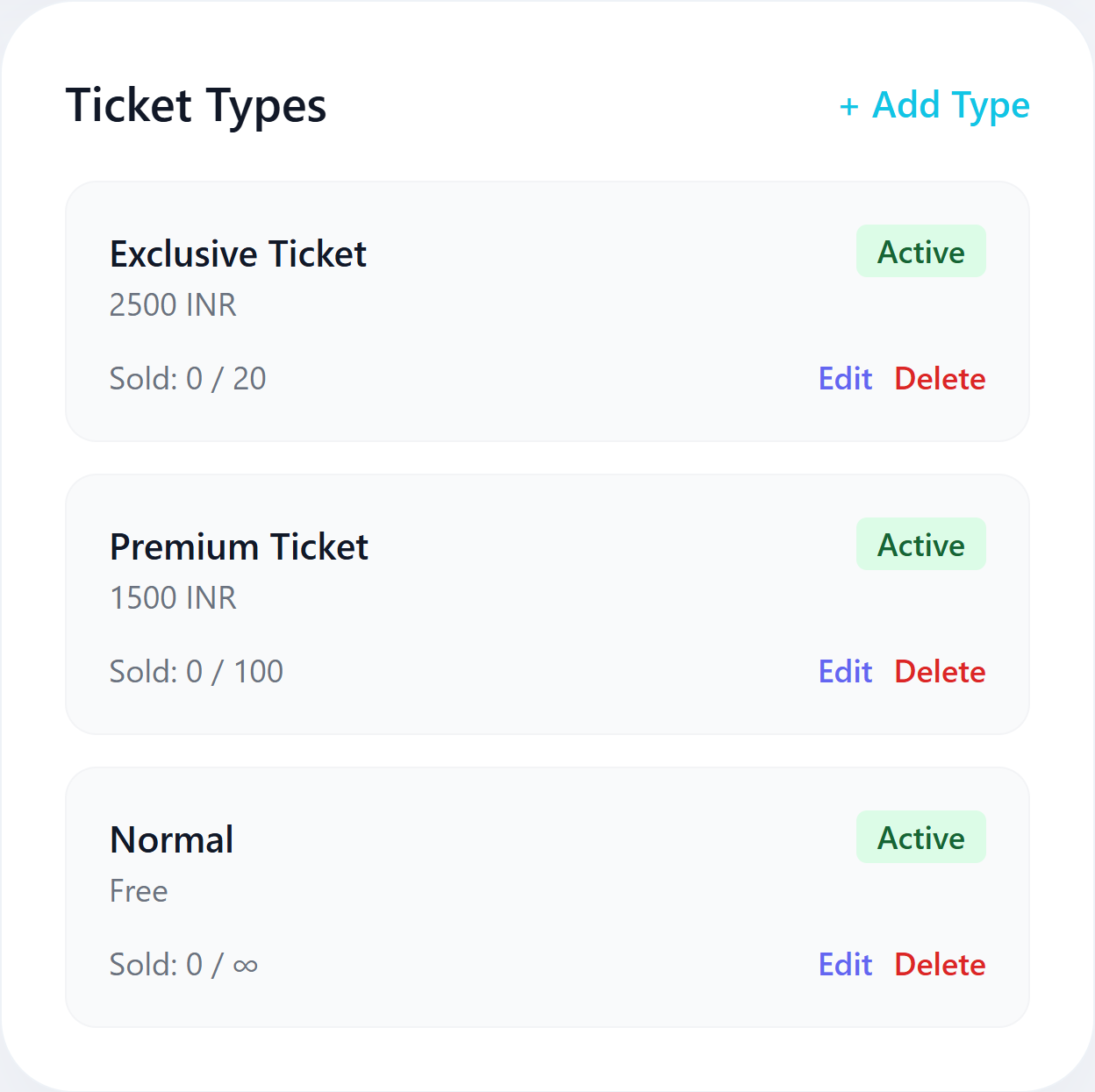
- + Add Type per event — Exclusive Ticket 2500 INR (Sold 0/20), Premium Ticket 1500 INR (0/100), Normal Free (0/∞), each with Active state and Edit/Delete
- Club members and public members register through the same public link
- Payers submit the transaction reference from your instructed payment method
- You verify the reference before confirming the booking — no blind approvals
Screen Bookings, Then QR Check-In at the Gate
Vet every booking and approve only those you need for that event. On the day, scan QR codes or type the booking reference manually.
- Booking review queue with approve / decline per attendee
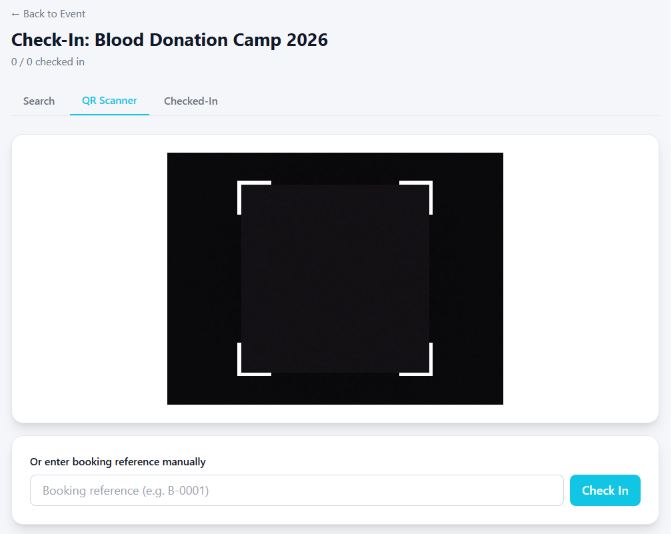
- Check-In screen with Search, QR Scanner and Checked-In tabs
- Full-screen QR scanner plus “enter booking reference manually (B-0001)” fallback
- Live checked-in count (e.g. 0/0 checked in) for gate control
Frictionless Workflow in 3 Simple Steps
Designed for high adoption among committee members, staff, and club members alike.
Create & Publish
Set schedule, venue, ticket types and booking rules, then share the public link.
Register & Verify
Attendees register, pay per guidelines and submit the transaction reference for verification.
Screen & Check In
Approve only needed bookings, then QR-scan attendees at the gate.
Delivering Measurable Results to Premier Clubs
Ticket Types / Event
Price and segment audiences instead of one flat list.
Payment-Reference Check
Every paid booking verified against its reference.
Screened Attendance
Approve only the attendees each event needs.
QR + Manual Gate Entry
Scan codes or type B-references when cameras fail.
Got Questions? We’ve Got Answers.
Everything you need to know about implementing this module for your organization.
Ready to Elevate Your Club’s Events?
Get a personalized 1-on-1 walkthrough configured to your club’s exact membership tiers, bylaws, and committee workflow.