
First Signup Starts With Induction
When users first sign up to a club using the membership application, they meet Induction first: the lesson that teaches club rules, how the club works and how the application works — with quizzes and rich media.
Why Clubs Are Upgrading to Lab of Club
See the immediate operational difference when moving from fragmented tools to a purpose-built club OS.
New Members Start Blind
- Nobody explains club-specific rules before day one
- New joiners do not know how the club works or who does what
- The application itself confuses first-time users
- One generic briefing cannot fit every membership type
A Lesson Gate for Every New Signup
- Induction appears first at signup via the membership application
- Lessons teach club rules, how the club works and how the application works
- Clubs create quizzes for a lesson or standalone quizzes to check understanding
- Links to websites, articles, video and audio are all supported — with separate inductions per membership type
Engineered for Operational Excellence
Explore the purpose-built tools designed to give your staff and committee complete control.
Induction Is the First Screen After Applying
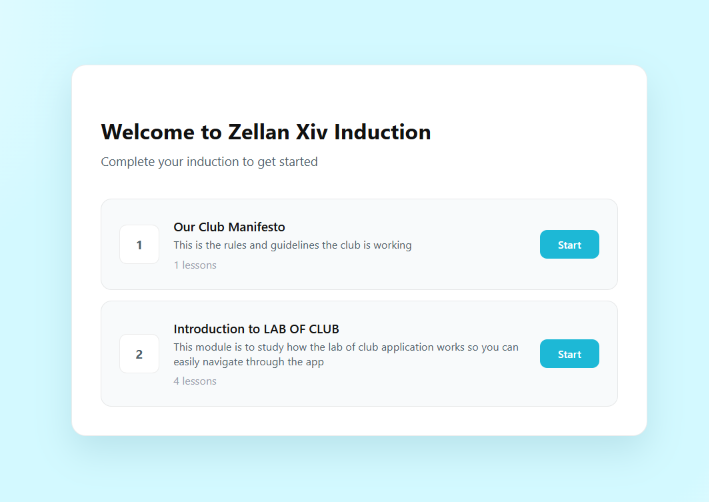
Before exploring the club, the new signup meets a welcome screen — “Complete your induction to get started” — with one Start button per module.
- Welcome to {Club} Induction greets every first signup via the membership application
- Module cards with lesson counts — Our Club Manifesto (1 lesson), Introduction to LAB OF CLUB (4 lessons)
- Start button launches the lesson flow; the must-pass gate before member screens unlock
- Separate induction content per membership type when needed
Teach Rules, Club Workings and App Usage
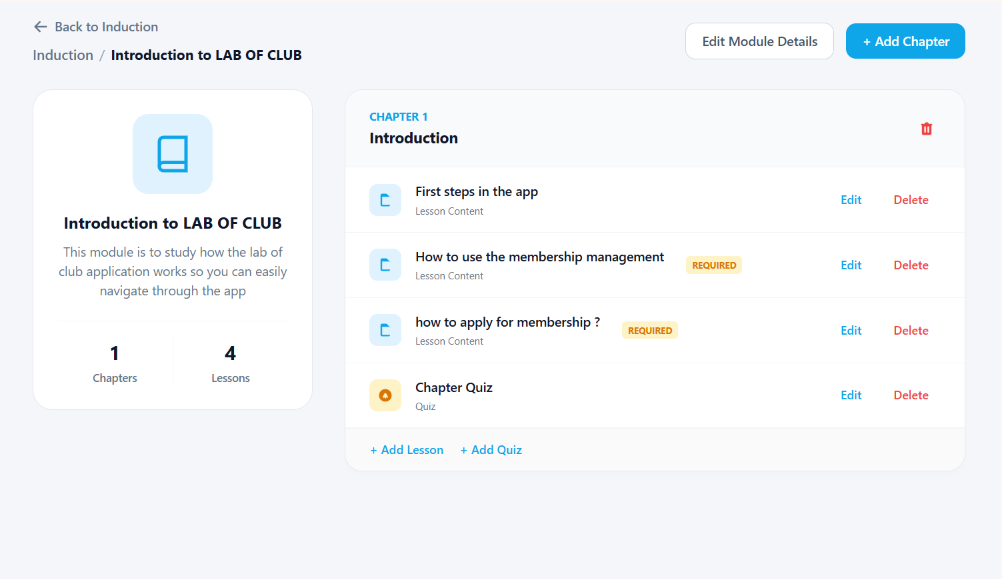
Clubs build modules chapter by chapter — Introduction to LAB OF CLUB teaches the app itself, lesson by lesson, with must-complete markers.
- Chapters group lessons — Chapter 1 Introduction: First steps in the app, membership management, how to apply
- REQUIRED flags on must-complete lessons so nothing critical is skipped
- + Add Chapter and Edit Module Details straight from the module header
- Edit / Delete on every lesson; module card tracks chapters and lesson counts
Quizzes per Lesson, Standalone or per Type
Attach a Chapter Quiz to any chapter or add standalone quizzes — and target whole modules per membership type while completion KPIs track onboarding.
- Chapter Quiz inside the module plus + Add Quiz for standalone assessments
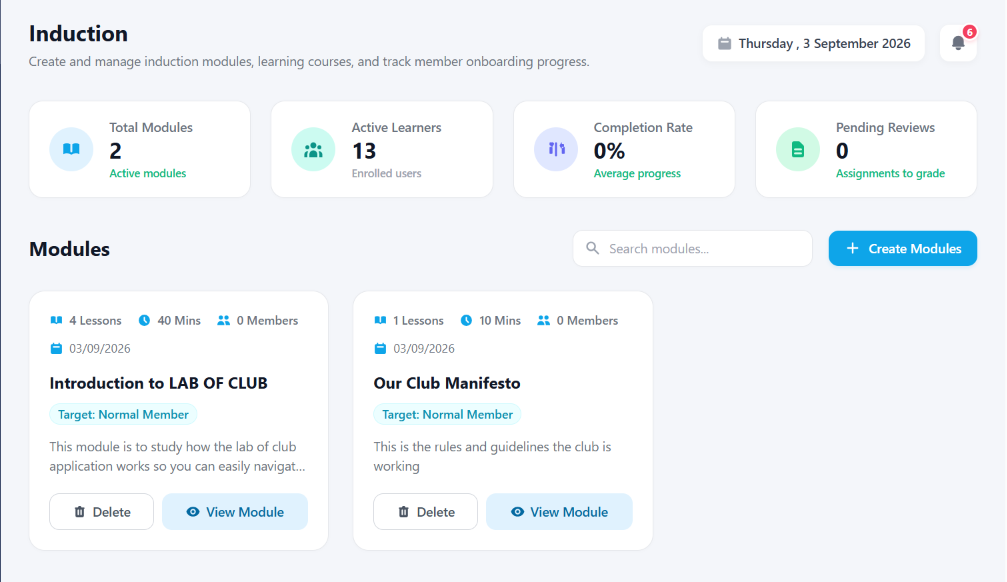
- Target badges per module (e.g. Normal Member) — separate inductions per membership type
- Completion Rate, Active Learners and Pending Reviews KPIs stay live
- Module cards track lessons, minutes and enrolled members before anyone proceeds
Frictionless Workflow in 3 Simple Steps
Designed for high adoption among committee members, staff, and club members alike.
Signup via Application
User joins through the club’s membership application link.
Complete Induction
First screen: lessons with web/article/video/audio plus quizzes.
Enter the Club
After induction (per membership type), the member proceeds inside.
Delivering Measurable Results to Premier Clubs
Screen Guarantee
Every application signup meets induction before anything else.
Media Support
Websites, articles, video and audio embed in lessons.
Lesson + Standalone Quizzes
Understanding is checked, not assumed.
Per-Membership Induction
Each membership type can carry its own onboarding.
Got Questions? We’ve Got Answers.
Everything you need to know about implementing this module for your organization.
Ready to Elevate Your Club’s Induction?
Get a personalized 1-on-1 walkthrough configured to your club’s exact membership tiers, bylaws, and committee workflow.